


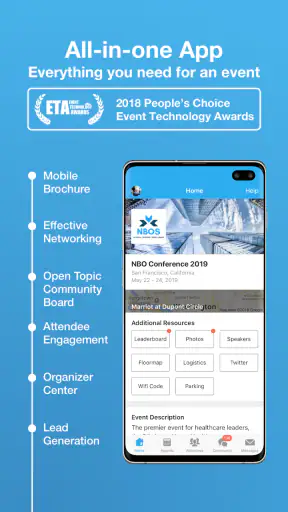
I tend to judge event apps by a simple question: do they reduce the small bits of friction that make conferences tiring? Finding the right session, remembering where to go, noticing a schedule change, and deciding whether a conversation is worth pursuing can become surprisingly difficult when everything is spread across paper programs, email threads, and separate messaging tools. Whova is built to bring those event details into one mobile experience, and after using it as a business and conference companion, I found its value depends less on flashy extras than on how well the event organizer has prepared the content.
This is a free business app from Whova, available for Android users on operating system version 8.0 or later. It has been around since October 7, 2013, and its current version is 12.5.0. The app is rated for Teen users, which is worth remembering if you are choosing tools for a mixed-age professional event or a student audience. With an average rating of 4.9 from around 31 thousand ratings and more than a million installs, it is clearly used at a substantial number of events rather than being a niche utility.
How I decide whether an event app is worth keeping
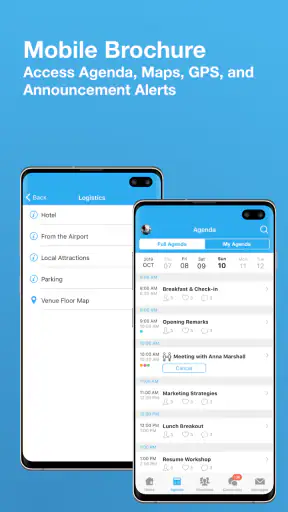
My first test is practical: can I open the app while walking between rooms and find the information I need without digging through several menus? A good event app should make the schedule readable, show enough context to help me choose between sessions, and let me return to important details later. Whova generally works best when I treat it as a personal event dashboard rather than merely a digital brochure.
The second test is whether it helps with decisions. A long conference program may contain dozens of talks, workshops, and networking opportunities, but I rarely need all of them. I need a way to identify the sessions that matter to me, keep them visible, and adjust my plan when my priorities change. That is where a dedicated event app can be more useful than a PDF or a timetable printed on several pages.
The third test is event-specific usefulness. Whova is not a general calendar, a full customer relationship manager, or a replacement for every communication platform used by a company. Its usefulness comes from the event it is connected to. If the organizer has uploaded a detailed schedule and kept it current, the app can become the place I check repeatedly. If the event has little information inside it, the installation alone will not create a better experience.
I also look at the cost of attention. An event app should not require constant maintenance from the attendee. I want to spend a few minutes setting up my plan and then return only when there is a reason. Whova is most convincing for people who attend conferences, trade events, professional gatherings, or organized meetings where the schedule and participant context are too complicated for a simple calendar entry.
What the first setup feels like
The initial experience is shaped by the event code, invitation, or registration path supplied by the organizer. That means the app may feel almost empty until the correct event is connected. This is not a flaw unique to Whova, but it is an important expectation: downloading it before your event is ready may not show you much that is useful.
Once the event is available, I would start by checking the schedule before browsing everything else. I look for sessions that overlap, note the ones that are essential, and leave room for breaks. This approach avoids a common mistake with conference apps: marking every interesting item and ending up with a plan that is impossible to follow.
I also recommend checking the event information again shortly before attending. Conference details can change, and the practical benefit of a mobile app is that it gives the organizer a place to communicate those changes. I would not assume that every event uses every part of Whova equally, though. The quality of the experience depends heavily on how much effort the host puts into maintaining the event space.
Where Whova is especially strong
Whova’s clearest strength is consolidation. Instead of switching between a PDF schedule, an email invitation, a separate networking page, and a map or announcement channel, I can use one event-focused app as the main reference point. That does not eliminate every question, but it reduces the mental overhead of remembering where each piece of information lives.
I find this particularly useful during multi-track conferences. In a printed program, it is easy to lose track of which room belongs to which session or to forget why I saved a particular talk. In a mobile schedule, I can make a more personal plan. The important distinction is that I am not just reading the organizer’s timetable; I am turning it into a working itinerary for myself.
That personal layer is one of the app’s more valuable ideas. A conference schedule is designed for everyone, while my day is not. I may care about one subject area, need to meet a particular type of professional, or have a fixed travel window. An event app earns its place when it helps me filter the broad program down to a realistic day.
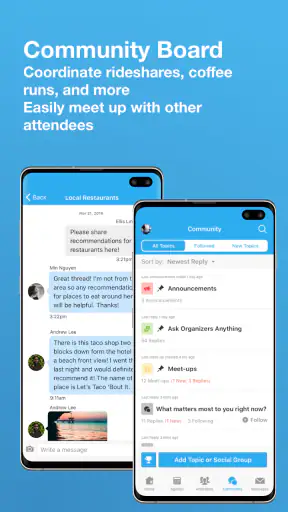
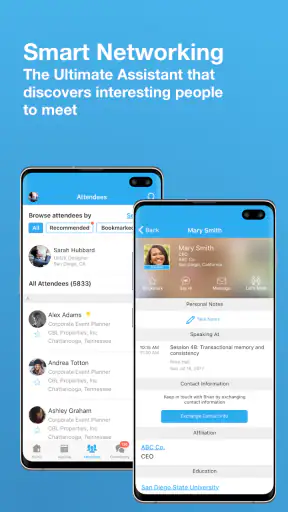
Another strong point is the connection between sessions and people. At a business event, a talk is often only part of the reason for attending. I may want to recognize speakers, identify participants with similar interests, or continue a useful conversation after a session. Whova’s event-centered approach makes that relationship more natural than a basic calendar application, because the schedule and the event community belong to the same context.
My advice is to use that context deliberately. Before the event, I would identify a few sessions that support my goals and a few people or discussion areas I want to explore. During the event, I would use the app as a prompt for action rather than endlessly browsing profiles or announcements. The best result comes from moving from information to a concrete plan.
Small workflows that make a real difference
One useful workflow is to build a “must attend, useful if nearby, and optional” plan. I do not need to treat every saved item equally. The first group protects the purpose of my visit, the second gives me flexibility, and the third prevents a quiet period from becoming wasted time. This is more realistic than trying to follow the full program from morning to evening.
A second workflow is to review the next part of the day during a natural pause, rather than waiting until I am already late for the next session. I check the upcoming room, decide whether I need to move, and reconsider any overlapping choices. This is where a mobile event schedule is more practical than a long document: it supports quick decisions while I am already in motion.
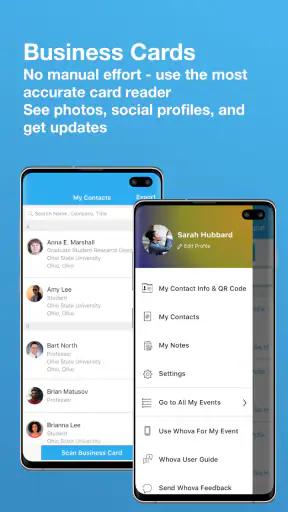
A third is to use the app as a memory aid after conversations. If I meet someone briefly between sessions, the event context can help me remember where the conversation happened and why it mattered. I still prefer a proper follow-up system for long-term relationship management, but Whova can bridge the gap between an in-person introduction and a later note in my usual tools.
There is also a useful trade-off in keeping the event app separate from my everyday calendar. A full calendar is better for protecting travel time and personal commitments, while Whova is better for understanding the event itself. I would not force one tool to do both jobs. I use the event app for the event’s internal structure and my normal calendar for commitments that extend beyond it.
How it compares with familiar alternatives
The most common alternative is a PDF or printed program. Those options are easy to share and do not depend on learning another interface, but they are awkward when the schedule is large or changes during the day. Whova has the advantage when I need a personal view of a complex program, especially if the event includes several simultaneous tracks.
Email is another alternative, and it remains useful for formal confirmations and important messages. It is less convenient as a live event guide because key details become buried in the inbox. Whova is better suited to quick event navigation, while email remains the safer place to retain registration records and messages that matter after the event.
Some organizers may use a general community or messaging platform instead. Those tools can be excellent for ongoing conversation, but they may not present the event schedule and attendee experience in a focused way. Whova makes more sense when the gathering itself is the center of attention. A general platform may be preferable when the community continues actively for months and the event is only one part of a larger relationship.
A simple calendar application is also a reasonable choice for a small meeting. If I only have two appointments, a dedicated event app may feel like unnecessary setup. Whova becomes more compelling as the event gains tracks, speakers, networking opportunities, announcements, and decisions that need to be made throughout the day.
Where another option may fit better
I would hesitate to recommend Whova for someone who rarely attends organized events or only needs a static appointment reminder. The app’s value is tied to event participation, so it is not something I would install as a general productivity tool and expect to use every week.
I would also be cautious if the organizer has not prepared the event thoroughly. No event platform can compensate for an incomplete schedule, unclear room information, or poor communication from the host. In that situation, a direct email or a simple web page may actually be faster because there is less to navigate.
People who prefer to keep all professional contacts inside a dedicated sales or relationship-management system may also find Whova limited as a long-term record. I see it as a useful event layer, not the permanent home for every contact I make. The right approach is to transfer meaningful follow-ups into the system I already trust after the event.
There is a similar limitation for attendees who dislike social features or do not want to engage with other participants. Whova can still be useful for the schedule, but part of its appeal comes from connecting the program with the people around it. If I only want a quiet timetable and nothing else, a lightweight calendar may feel less distracting.
What switching to Whova really involves
The cost of switching is not mainly financial because the app is free. The real cost is behavioral: I need to learn where the event’s schedule, people, notices, and personal planning tools are located. For a one-day meeting, that learning curve may not be worth much. For a large conference, the time saved by having one event workspace can outweigh the initial adjustment.
There is also a preparation cost for organizers. Attendees experience the finished app, but the quality of that experience depends on the event team entering accurate information and keeping it useful. If I were choosing Whova for an organization, I would budget time for content preparation, attendee communication, and testing the event experience before inviting everyone.
For attendees, I would prepare in three short stages. First, connect to the correct event and scan the schedule. Second, create a deliberately small personal plan rather than saving everything. Third, decide what information needs to move into my ordinary calendar or notes app. That keeps Whova focused and prevents it from becoming another inbox.
Privacy and notification preferences are also part of the switching decision, even when an app is useful. I prefer to review alerts early and keep only the notifications that help me act. An event app can become noisy if every update feels equally urgent. The best experience comes from treating notifications as navigation assistance, not as a constant stream to monitor.
My recommendation for different kinds of users
For a conference attendee, I recommend Whova when the event has a substantial program and the organizer is actively using the platform. It is especially suitable if I need to compare sessions, build a personal itinerary, and make sense of the people and topics connected to the event. The free price removes the biggest barrier for individual attendees, although the practical value still depends on the event itself.
For a small business meeting, I would first ask whether the meeting has enough moving parts to justify a dedicated event environment. If the answer is no, a calendar invitation and a concise information page may be simpler. If the meeting includes several sessions, participants, or networking goals, Whova becomes easier to justify.
For organizers, I see the app as a way to give attendees a clearer center of gravity. It can reduce the need to scatter information across different channels, but it should not be treated as a magic solution. The team still needs a clear schedule, sensible announcements, and a plan for helping attendees understand what to do inside the app.
The app’s Teen content rating also makes it more broadly suitable than a tool restricted to adults, but I would still match its use to the event’s audience and communication standards. The rating does not replace thoughtful moderation or clear event guidelines.
The limitations I noticed before recommending it
My main reservation is dependence on organizer quality. When the event is well structured, Whova can feel like the missing layer between a program and a genuinely usable day. When the event content is thin or outdated, the app may feel like an extra stop rather than a solution. That distinction is important because it is easy to blame the app for a weak event setup.
The second limitation is that a single event workspace can become crowded. A large program may include many screens, people, and updates, and not every attendee wants to explore all of them. I get better results by entering with a clear purpose and using the app selectively.
The third is that it does not replace every tool around an event. I still want my normal calendar for travel and personal obligations, email for records, and a dedicated contact system for long-term follow-up. Whova works best when I give it a defined role instead of expecting it to become my entire professional workflow.
Those limitations do not cancel out its strengths. They simply explain why I would judge the event implementation before judging the app in isolation. The product is most valuable when the organizer has created a complete, current, and attendee-friendly event space.
Final decision: who should download it
Whova is a strong choice for people attending conferences and business events where the schedule, networking, and announcements are too involved for a PDF or ordinary calendar. Its high average rating, broad adoption, and long availability support the impression that it has become a familiar option in this category, but my recommendation is still based on fit rather than popularity.
I would download it when an organizer directs me there, connect it to the right event, and spend a few minutes building a realistic plan. I would keep my expectations practical: use it to navigate the event, make better session choices, and remember useful connections, then move lasting tasks into my regular tools.
My clear recommendation is to use Whova when the event itself is complex and actively maintained. It is less compelling for a tiny meeting, a static schedule, or anyone looking for a permanent business-contact manager. For the right conference, though, it replaces several scattered sources of information with one focused companion, and that is exactly the kind of convenience I want from an event app.


